
Membership
The Membership page helps societies maintain a register of members as required by the Incorporated Societies Act 2022. It records member information, tracks membership numbers, and ensures the society meets minimum member thresholds. The page also manages consent and privacy requirements for member data.
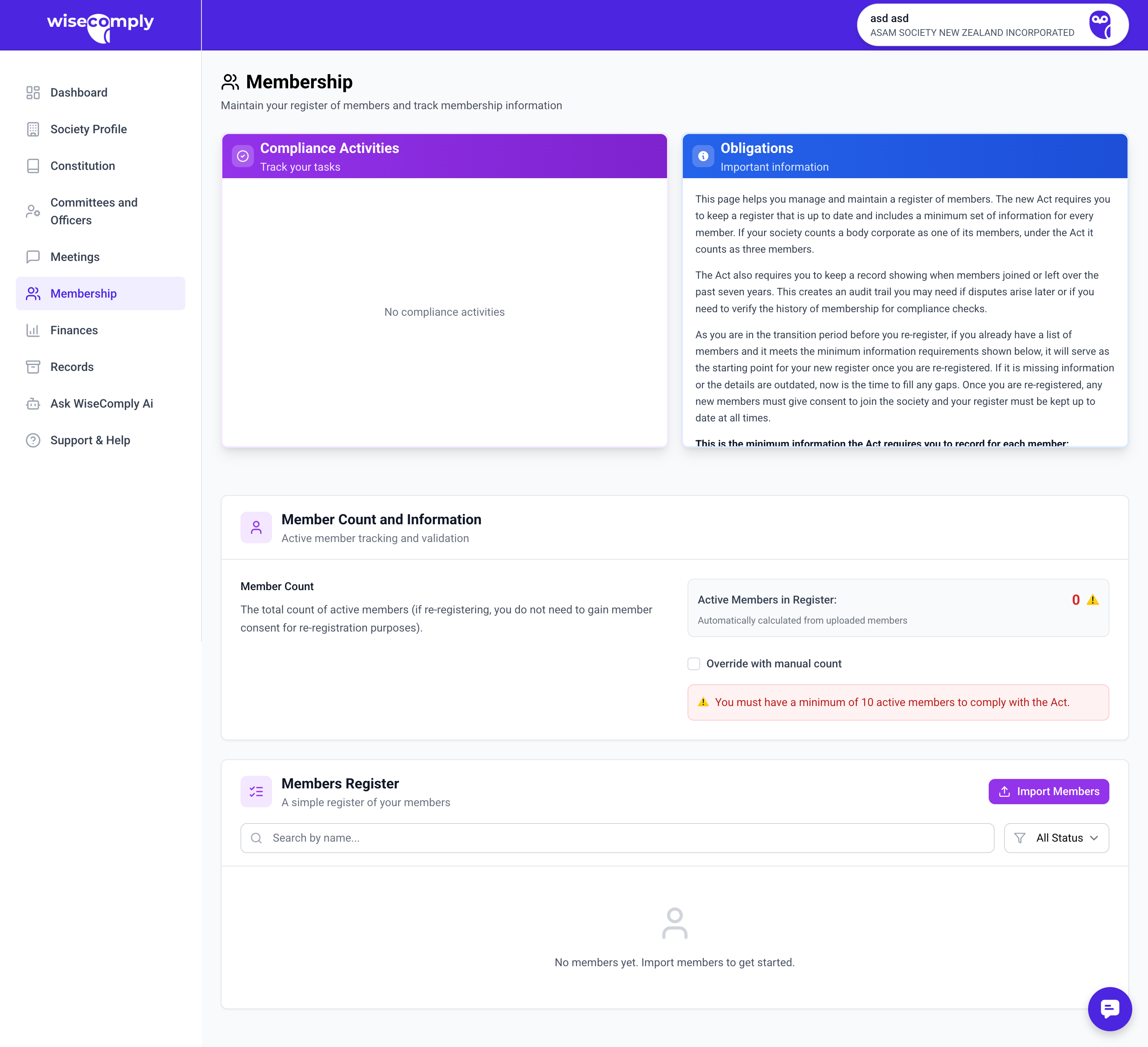
What You Can Do on This Page
Add new members to the register
Update existing member details
Record current member count
Deactivate members who have left while retaining historical records
Complete the Register of Members Declaration
Track member consent for data collection (for re-registration purposes)
Confirm notifications to the Registrar and Charities Services if membership drops below required thresholds
Key Parts of the Membership Page
Actions Panel Shows available member-related tasks:
Update member details
Links to add or modify member records
Obligations Panel Explains legal requirements for membership records including:
What data must be collected under the Act
Additional information required by the constitution
Consent requirements for new members joining during re-registration
Privacy Act responsibilities for storing member information
Member Count and Register Information Displays and tracks:
Current member count (total active members)
Note about re-registration consent requirements
Register of Members Declaration checkbox and timestamp
Register of Members Declaration Lists the minimum information that must be recorded for each member:
Name of each member
Last known contact details
Date they became a member
Names of anyone who ceased membership in the previous 7 years
Date each person ceased to be a member
Common Tasks
Adding a New Member
Click "Add new member" (button typically in member list view)
Enter required information:
Full name
Contact details (email, phone, address)
Date joined
Record consent if member joined during re-registration period
Save the member record
Updating Member Details
Click "Update member details" in Actions panel or find member in list
Edit the information that has changed
Save changes
System logs the change history automatically
Recording Current Member Count
Enter total number of active members in "Current Member Count" field
This count is used for tracking compliance with minimum member thresholds
Update when members join or leave
Completing the Register of Members Declaration
Review the list of required information
Ensure all member records contain this information
Check the declaration checkbox to confirm compliance
Declaration is timestamped and stored
Deactivating a Member
Open the member's record
Change status to inactive or select "ceased membership"
Enter date they left
System retains the record for historical purposes (must keep for 7 years)
Important to Know
About Member Thresholds:
Societies must maintain a minimum number of members (typically 10 for re-registration, but check specific requirements)
If membership drops below the threshold, the Registrar must be notified
Charities Services must also be notified if the society is a registered charity
About Member Consent:
New members joining during re-registration must consent to join the society
Existing members at the time of re-registration do not need to provide new consent
Societies must only collect member information they genuinely need
Member data must be stored securely
About Privacy Requirements:
Societies must comply with the Privacy Act 2020
Only collect necessary information
Store data securely
Inform members how their information will be used
Visit the Privacy Commissioner's website for detailed guidance
About Record Retention:
Member records must show anyone who ceased membership in the previous 7 years
Historical records should be retained permanently for organizational history
Common Questions
Do we need consent from all existing members for re-registration? No. Consent is only required from new members who join from the date of re-registration onwards. Existing members at the time of re-registration don't need to provide new consent.
What's the minimum number of members we need? For re-registration, societies typically need at least 10 members, though this can vary. Check your constitution for any higher requirements. Once re-registered, the minimum is usually lower (often 3-5 members).
What happens if we drop below the minimum member threshold? The society must notify the Registrar within the required timeframe. If registered as a charity, Charities Services must also be notified. WiseComply helps track these notifications.
Can we store members' personal information? Yes, but only information that is necessary for society operations or required by law. You must store it securely and comply with Privacy Act requirements.
How do we handle members who don't want their information stored? Under the Act, societies must maintain a register of members. However, you should only collect necessary information. If a member objects, discuss what minimum information is required and ensure they understand why it's needed.
Do we need to keep records of past members? Yes, for anyone who ceased membership in the previous 7 years, you must record their name and the date they ceased to be a member.