
Committees and Officer
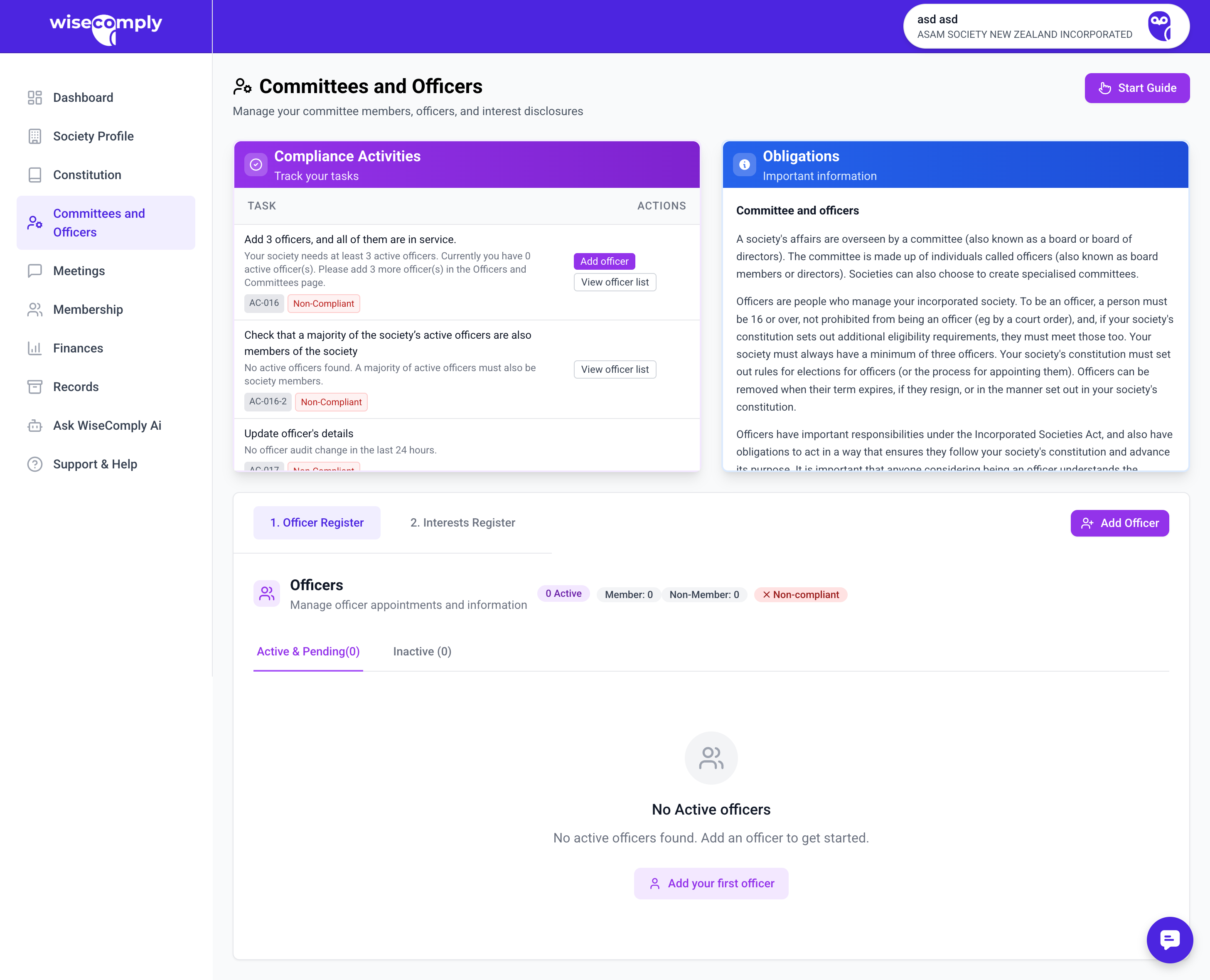
The Committees and Officers page helps societies maintain accurate records of their officers (committee members), track conflicts of interest, and manage subcommittees. This page ensures the society meets legal requirements for officer appointments, transparency, and governance under the Incorporated Societies Act 2022.
What You Can Do on This Page
Add and manage officer records (active, pending, and inactive)
Track officer compliance requirements
Enable and manage an interests register to record conflicts of interest
Enable and manage subcommittee structures (PENDING)
Confirm officer obligations have been explained and accepted
Confirm notifications sent to the Registrar and Charities Services about officer changes
View officer appointments and terms
Key Parts of the Committees and Officers Page
Actions Panel Shows current tasks related to officers and committees, including:
· Alerts when the society needs more officers (minimum 3 required)
· Links to add officers or update existing officer details
· Audit trail of recent officer changes
Obligations Panel Explains what the page helps users accomplish:
· Add and manage officers
· Track officer compliance requirements
· Manage committee structures
· Record and monitor conflicts of interest
Officer Register Tab The main view for managing officer records. Shows:
· Total count of active officers
· Tabs for "Active & Pending" and "Inactive" officers
· List of all officers with their details, roles, and appointment dates
· "Add Officer" button to add new committee members
Interests Register Tab Optional feature to track conflicts of interest declared by officers. Can be enabled or disabled based on society needs.
Start Guide Button Launches a step-by-step wizard to help new users set up their officer records correctly.
Common Tasks
Adding an Officer
1. Click "+ Add Officer" button (or "Add your first officer" if starting fresh)
2. Enter officer details: name, email, phone, address
3. Select their role(s) (e.g., President, Treasurer, Secretary)
4. Add appointment date
5. Confirm they understand officer obligations
6. Save the record
Updating Officer Details
1. Find the officer in the Active & Pending list
2. Click "Edit" or the officer's name
3. Update relevant information
4. Save changes
5. If required, notify the Registrar of changes within 20 working days
Enabling the Interests Register
1. Navigate to the "Interests Register" tab
2. Toggle "Enable Interests Register"
3. Add interests when officers declare them
4. Update as new conflicts arise or are resolved
Managing Subcommittees
1. Enable subcommittee management in settings
2. Add subcommittee details (name, purpose, members)
3. Upload subcommittee records or meeting notes as attachments
4. Confirm subcommittees are managed according to the constitution
Moving Officers to Inactive When an officer leaves:
1. Open their record
2. Change status to "Inactive"
3. Add end date for their term
4. Notify the Registrar if required
Important to Know
About Officers:
· Societies must have at least 3 officers at all times
· Officers have legal duties including acting in good faith, exercising care and diligence, and avoiding conflicts of interest
· Officers must understand their obligations before being appointed
· Changes to officers must be notified to the Registrar within 20 working days
About the Interests Register:
· Optional but recommended for transparency
· Records situations where officers may have conflicts of interest
· Helps officers manage their duty to avoid conflicts
· Should be reviewed regularly at committee meetings
About Subcommittees:
· Must be established according to the society's constitution
· Should have clear terms of reference and reporting lines
· Records should be maintained and attached in WiseComply
About Notifications: When officers join or leave, societies must notify:
· The Incorporated Societies Registrar (always required)
· Charities Services (if the society is a registered charity)
Common Questions
How many officers do we need? The Act requires at least 3 officers. The society's constitution may require more or specify particular roles (e.g., President, Treasurer, Secretary).
What are officer obligations? Officers must act in good faith, exercise care and diligence, not misuse their position, and avoid conflicts of interest. WiseComply helps track confirmation that officers understand these duties.
Do we have to use the Interests Register? Not required by law, but highly recommended as a best practice for managing conflicts of interest and maintaining transparency.
What happens if we drop below 3 officers? The society is not compliant with the Act. WiseComply will alert users and prompt them to add officers. The Registrar must be notified if this occurs.
Can one person hold multiple roles? Yes, but the society's constitution may have specific rules. Some societies require the Treasurer and President to be separate people, for example.
What's the difference between Active and Pending officers? Active officers are currently serving. Pending may indicate officers who are appointed but haven't formally commenced their role yet (e.g., elected but term hasn't started).