
Constitution
The Constitution page helps societies create or update their constitution to meet the requirements of the Incorporated Societies Act 2022. The Constitution page has two tabs for managing your society’s constitution.
Constitution Workflow: A 4-step guided process for developing and approving your constitution:
Develop Draft: Create your initial constitution using the Wise Builder or upload an existing document
Gather Member Feedback: Share your draft with members and collect their input
Seek Approval: Hold a meeting to vote on the constitution
Submit and File: Register the approved constitution with the Companies Office
Each step has requirements to complete before moving to the next. You can upload documents at each stage (e.g., the reviewed draft, the approved version, the final filed copy).
Wise Builder
The Wise Builder is an interactive form that guides you through creating a constitution section by section. It covers 12 blocks. Use this if you need to develop a new constitution for your society.
What You Can Do on This Page
Build or revise the society's constitution using the step-by-step Constitution Builder
Upload your society's logo
Track overall constitution completion progress
Download draft versions for review
Download the final PDF once complete
Confirm the constitution has been socialised with members
Confirm whether legal advice was sought
Confirm approval was gained at a general meeting
Add the approved constitution to society records
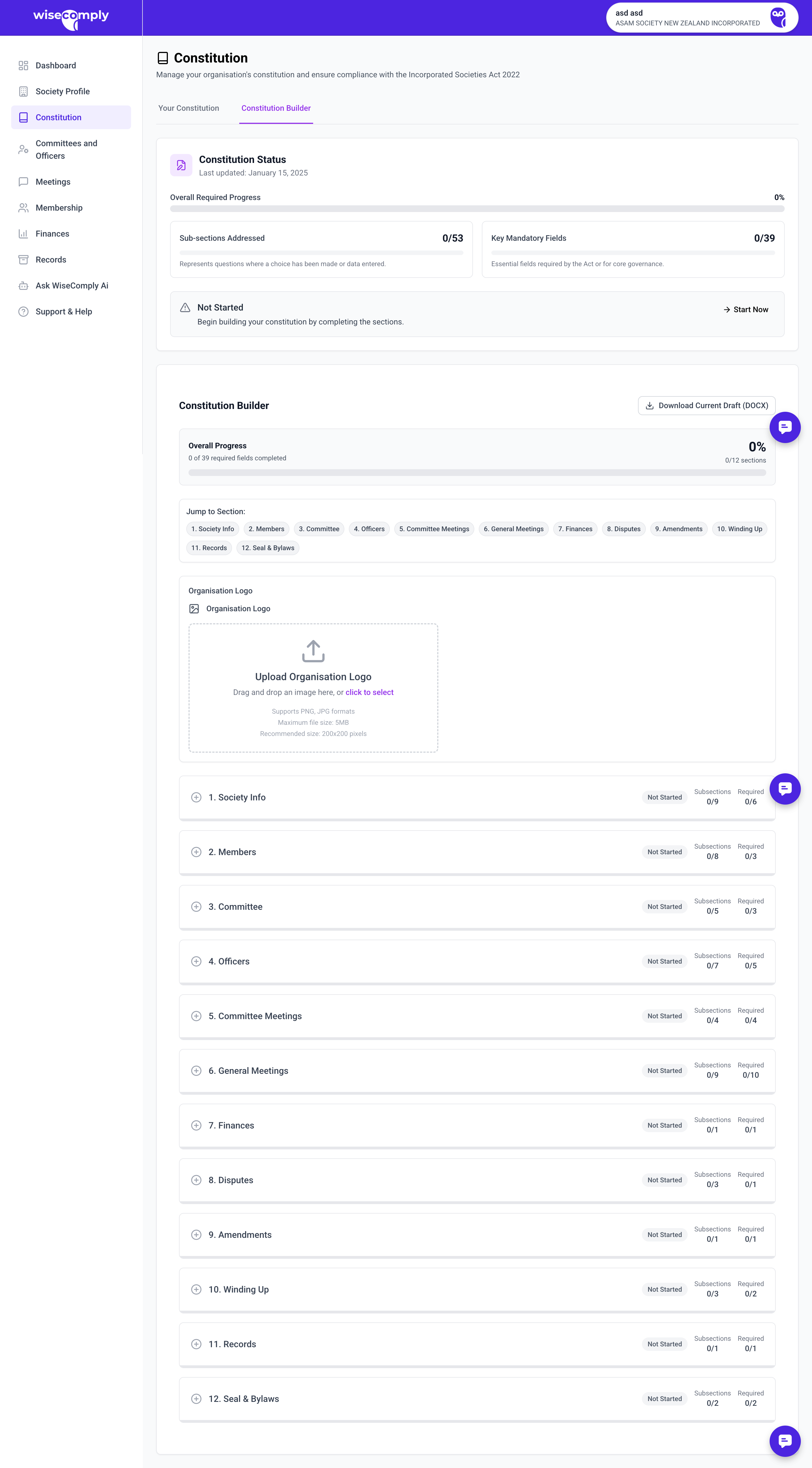
Key Parts of the Constitution Page
Actions & Obligations Panel: The left sidebar shows constitution-related tasks, including a link to launch the Constitution Builder and checkboxes to confirm legal requirements have been met.
Organisation Logo: Upload your society's logo to appear on the constitution document. Accepts PNG, JPG, or SVG files up to 2MB.
Constitution Status Shows real-time progress, including:
Overall completion percentage
Number of sub-sections addressed (e.g., 8/53)
Number of key mandatory fields completed (e.g., 6/39)
Last updated date
Status badge (In Progress, Complete)
Download options for current draft or final PDF
Constitution Builder: A structured editor divided into 12 sections:
Society Info
Members
Committee
Officers
Committee Meetings
General Meetings
Finances
Disputes
Amendments
Winding Up
Records
Seal & Bylaws
Each section shows its status (Not Started, In Progress, Complete) and how many subsections and required fields remain.
Jump to Section Navigation Quick links to jump directly to any of the 12 constitution sections.
Common Tasks
Starting Your Constitution
Click "Start Constitution Builder" in the Actions panel
Begin with Section 1 (Society Info) or use "Jump to Section" to start elsewhere
Complete fields in each subsection
Save progress as you go
Download drafts using "Download Current Draft" to review offline
Completing a Section
Click on a section in the Constitution Builder
Fill in all required fields (marked with red indicators)
Complete optional fields as needed
Section status will update to "Complete" when all required fields are filled
Progress bars update automatically
Finalising Your Constitution
Complete all 12 sections (100% progress)
Download the final PDF
Share with members for feedback (confirm this in the Actions panel)
Present for approval at AGM or SGM
Once approved, confirm approval in the Actions panel
Upload the signed/approved version to Society Records
Important to Know
About the Constitution Builder:
Progress is saved automatically as users work
Sections can be completed in any order, but sequential completion is recommended
Red progress bars indicate required sections; these must be completed
The builder ensures compliance with the Incorporated Societies Act 2022 requirements
About Required vs Optional Fields:
"Key Mandatory Fields" (shown in red) are legally required by the Act
"Subsections" include both mandatory and optional content
Societies cannot finalize their constitution until all mandatory fields are complete
About Legal Requirements:
Constitutions must be approved by members at a general meeting (AGM or SGM)
Societies are encouraged (but not required) to seek legal advice when drafting constitutions
The approved constitution must be stored in society records
Constitution changes require member approval and must be notified to the Registrar
Common Questions
Can I complete the constitution sections in any order? Yes, but it's recommended to work sequentially as some sections may reference earlier content.
What happens if I don't complete all mandatory fields? The society cannot finalise its constitution or complete re-registration until all mandatory fields are addressed. WiseComply tracks which fields still need attention.
Do I need a lawyer to review my constitution? Not legally required, but recommended for complex societies or those with unique governance needs. WiseComply asks you to confirm whether legal advice was sought.
Can I download and edit the constitution outside of WiseComply? Yes, download drafts at any time. However, the final version should be generated through the Builder to ensure compliance. If edited externally, upload the final approved version to Society Records.
What's the difference between "Download Current Draft" and "Download PDF"? "Download Current Draft" provides a work-in-progress version for review. "Download PDF" (available when complete) provides the final formatted constitution.