
Society Profile
What This Page Does
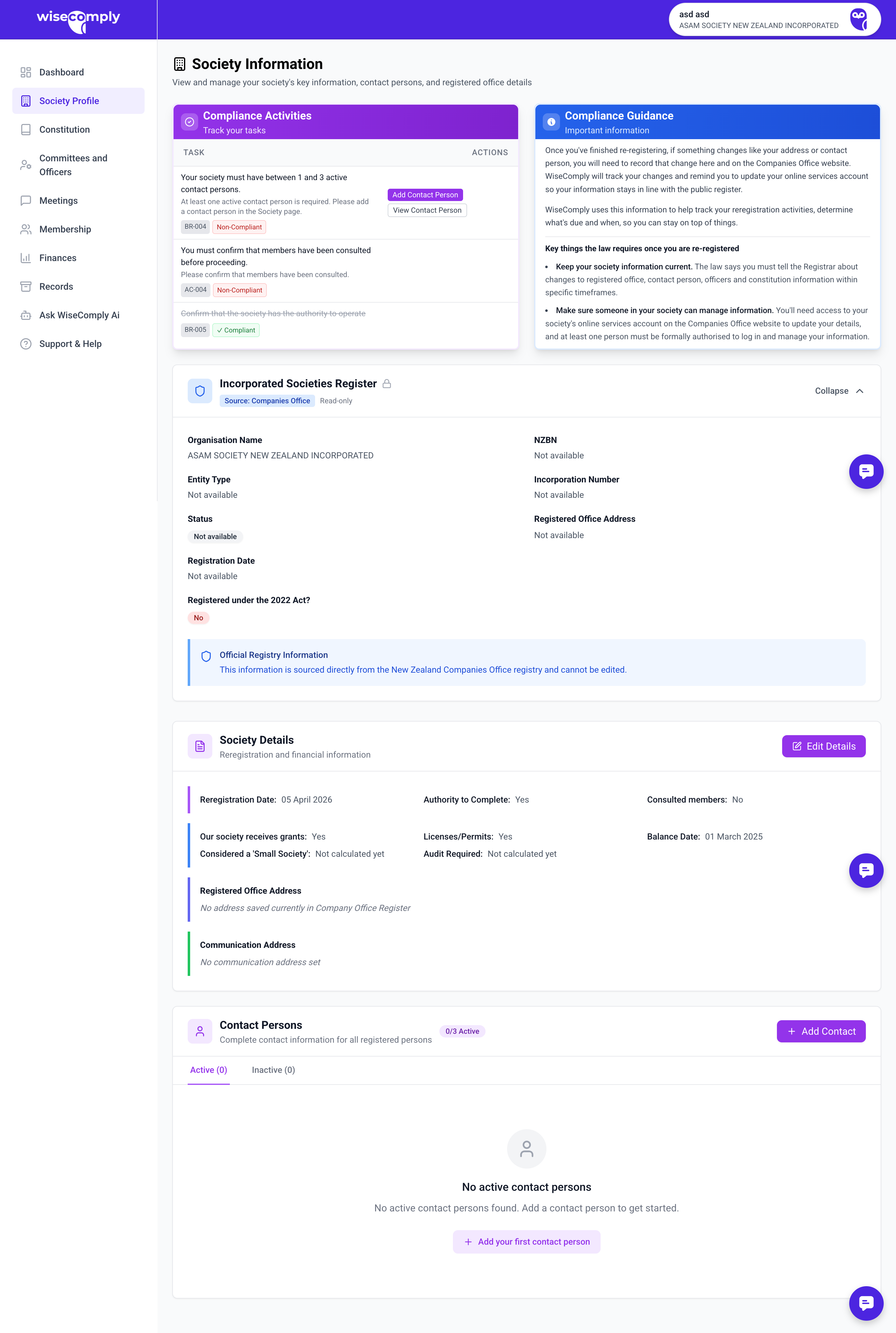
Society Profile stores the core details about your society that are required by law. This includes your society's name, registration numbers, official addresses, and contact people who can communicate with government agencies on behalf of the society.
What You Can Do on this page
Add or update contact persons
Add or update the registered office address
Add a communication address for day-to-day correspondence
Edit society details (name, suburb, city)
Key parts of the Society Profile page
Actions & Obligations Panel: The left sidebar shows a checklist of tasks related to society information. Blue links indicate actions you can complete. These include:
Adding or updating information
Confirming notifications sent to regulators
Confirming member approval for key decisions (like reregistration)
Green checkmarks appear when tasks are complete.
Incorporated Societies Register Displays your society's legal details including name, entity type, registration status, and NZBN numbers. This information comes from your original incorporation and cannot be changed.
Society Details holds details about your society. Some of these details can be changed (like Communication Address), others cannot (like your name) and Registered Office. Registered Office is the society's official legal address. This must be a physical address in New Zealand (not a PO Box) and is publicly visible on the register.
Contact Persons are people authorised to communicate with the Incorporated Societies Registrar and Charities Services on behalf of the society. At least one contact person is required.
Common Tasks
Adding a Contact Person
Click "+ Add Contact" button
Enter their name, email, phone, and role
Save the record
Important to Know
About Contact Persons:
Must have authority to manage information on the register
Need a RealMe login to submit applications online
Should be committee members or authorized representatives
About the Registered Office:
Must be a physical address where documents can be served
Cannot be a PO Box
Changes must be notified to the Registrar (and Charities Services if registered)
Common Questions
Can I use a committee member's home address as the registered office? Yes, as long as it's a physical address in New Zealand and that person consents.
What's the difference between Communication Address and Registered Office? The registered office is your official legal address (publicly visible). The communication address is where you prefer to receive day-to-day mail and can be kept private.
Why do I need to confirm notifications separately? WiseComply tracks your compliance but doesn't submit notifications directly to government agencies. You must log into the Incorporated Societies Register or Charities Services separately to make official notifications.